en


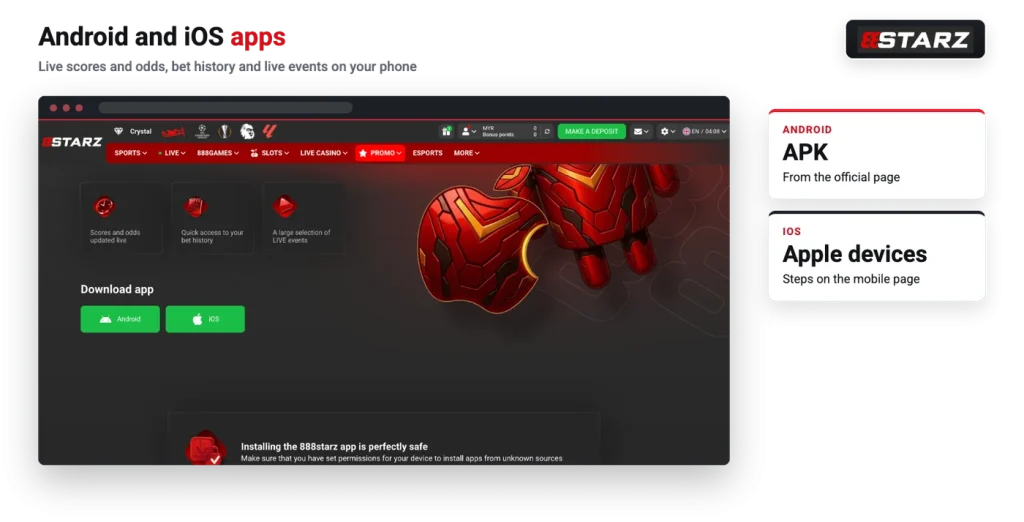
888starz publishes a mobile app for both Android and iOS, with the download buttons for the two systems sitting together on its mobile page. The Android version arrives as an APK file installed outside Google Play, so it needs one extra permission step. On iOS the route runs through the App Store instead.
This guide covers what the app is built to do, how the Android install goes, what to expect on iPhone, and what to use if you would rather not install a file at all.
The mobile app is aimed at players who follow events while they are running rather than browsing a lobby at leisure. Three things are listed as its core functions:
Those three are more connected than they look. Odds that refresh while a match is in play are what makes in-play wagering possible at all, so a phone that keeps prices current is the difference between placing a bet at the number you saw and watching it move away from you. If that is your main interest, it helps to reading how the markets themselves are structured for live betting before you commit a deposit to a phone screen.
Bet history in two taps matters for a different reason. Once you have several open selections running at once, the history and open-bets view is where you check settlement and keep track of what is still live.
A QR code linking to the app also appears on the sports section of the site, which is the quickest way to move the download from a desktop screen to your phone.
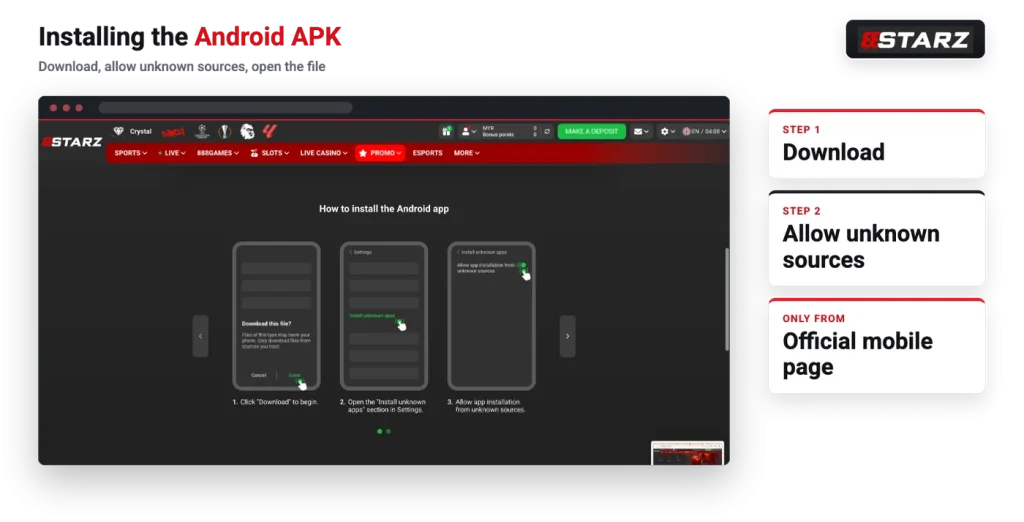
Android is the route with an extra step, because the file does not come from Google Play. An APK is simply the installer package Android uses; when it is downloaded from a website instead of a store, the system blocks the install until you confirm you trust the source. On current Android versions that permission is generally granted per app, so you are approving your browser to install one file rather than opening the phone up permanently.
Before you continue
Never install a 888starz APK from a third-party site, a file-sharing page or a link someone sends you. Use the operator’s own mobile download page and nothing else.
The sequence itself is short.
The permission step is the one real friction point here, and it helps to understanding rather than clicking past. Because the app lives outside Google Play, updates and checks do not run through the store, which is exactly why the source you download from matters so much. If you have not registered yet, it is easier to create an account first and arrive at the app with working credentials, especially if you signed up by one click and still need to save the generated username and password somewhere safe.
On iPhone there is no APK and no unknown-sources prompt. The iOS download button sits on the same mobile page as the Android one, and the steps set out there start inside the App Store: open the store, go to your account, then tap your name and continue from there.
Beyond that, the specifics of any App Store listing depend on the store region your Apple ID uses, which is normal for gambling apps generally and not something to guess at. Follow the operator’s own iOS steps and check the result against your own store account.
There is a mobile version of the site, linked from the footer, and it is a perfectly reasonable answer for anyone who does not want a sideloaded file on their phone. It runs in the browser you already have, so nothing needs permissions and nothing takes up storage space.
Most mobile browsers can also save a page to the home screen as an icon. That is a shortcut rather than an app: it opens the site in the browser, so features that depend on an installed app are not part of the deal. For a player who mainly checks a few markets or a balance, the difference in practice is small.
Sideloaded installers are a known target for imitation, and the risk is not theoretical. A repackaged file with a familiar logo can look identical on the download page and still be built to harvest the login details you type into it. Two habits remove most of the exposure.
First, only ever take the file from the operator’s official mobile download page, and reach that page yourself rather than through a forwarded link. Second, treat your credentials as the valuable part. The account number and password generated by one-click registration are the only copy you get, so save them properly, and use the Security area in your account menu to review your settings once you are in.
One more practical point: the operator’s own payment rules prohibit third-party payment methods, which means a compromised login is not just an account problem but a money problem. Keeping the install route clean is the cheapest security step available to you.
Both download buttons and the mobile site sit in the same place, so you can pick the Android APK, the iOS route or the browser version from one page.
If you are still weighing up whether to open an account in the first place, our guide to the operator sets out what the platform covers and where its rules bite hardest, from bonus wagering to verification checks.